



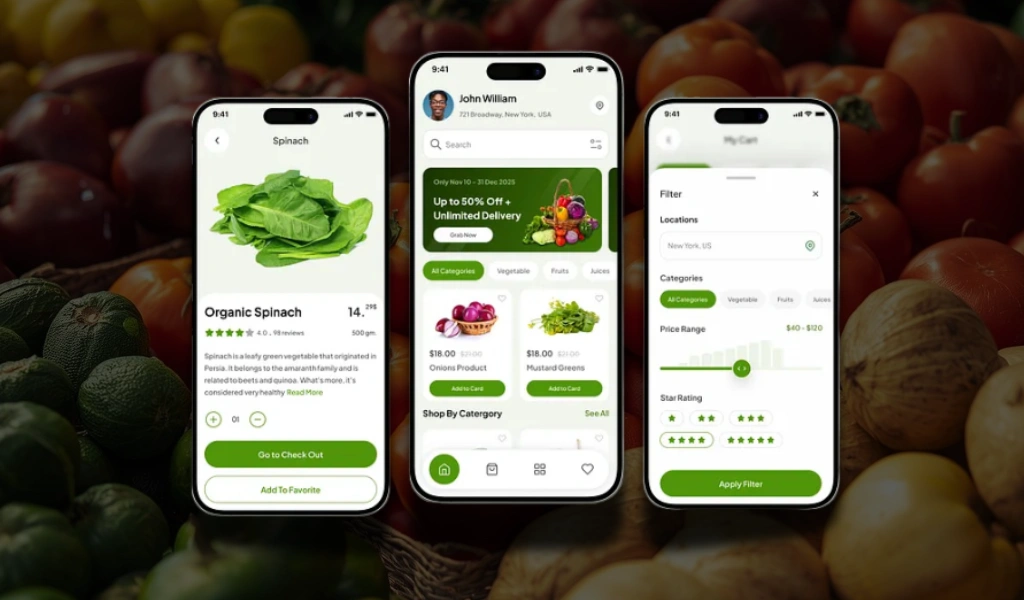
Today’s customers don’t want five different apps for five different tasks. They want one app that does it all: groceries, food, couriers, and more. That’s exactly where a Dunzo clone comes in.
It’s a ready-made, customizable platform that helps you launch a full-scale, on-demand service app. Whether you’re planning to offer deliveries, pickups, or food ordering, this solution lets you bring everything under one roof. No need to build from scratch or juggle separate systems; it’s all built in and ready to scale.
If you’re looking to create a super-app that covers multiple services and gives users a smooth, one-stop experience, a Dunzo clone is the way to go.
Supercharge your deliveries with Enatega.
Register NowWhat is Dunzo?
Dunzo is an Indian hyperlocal delivery service that helps users get everyday items, such as groceries, medicines, food, documents, and packages, delivered quickly within a city. It connects users with delivery partners via a mobile app or website to fulfill errands in real-time.
| Main Details About Dunzo | |
| Feature | Description |
| Founded | 2015 |
| Headquarters | Bangalore, India |
| Business Model | Hyperlocal logistics and on-demand delivery |
| Core Services | Grocery delivery, medicine delivery, parcel pickup/drop, food delivery, pet supplies, etc. |
What is a Dunzo Clone?
A Dunzo clone is a pre-built, highly customizable on-demand delivery app solution that replicates the core functionalities of Dunzo. It gives you full control over branding, business model, and scalability.
Whether it’s groceries, medicines, or instant courier services, a Dunzo clone helps you launch your delivery business faster, smarter, and more affordably.
How Does a Dunzo Clone App Work?
Below is the workflow of the Dunzo app clone.
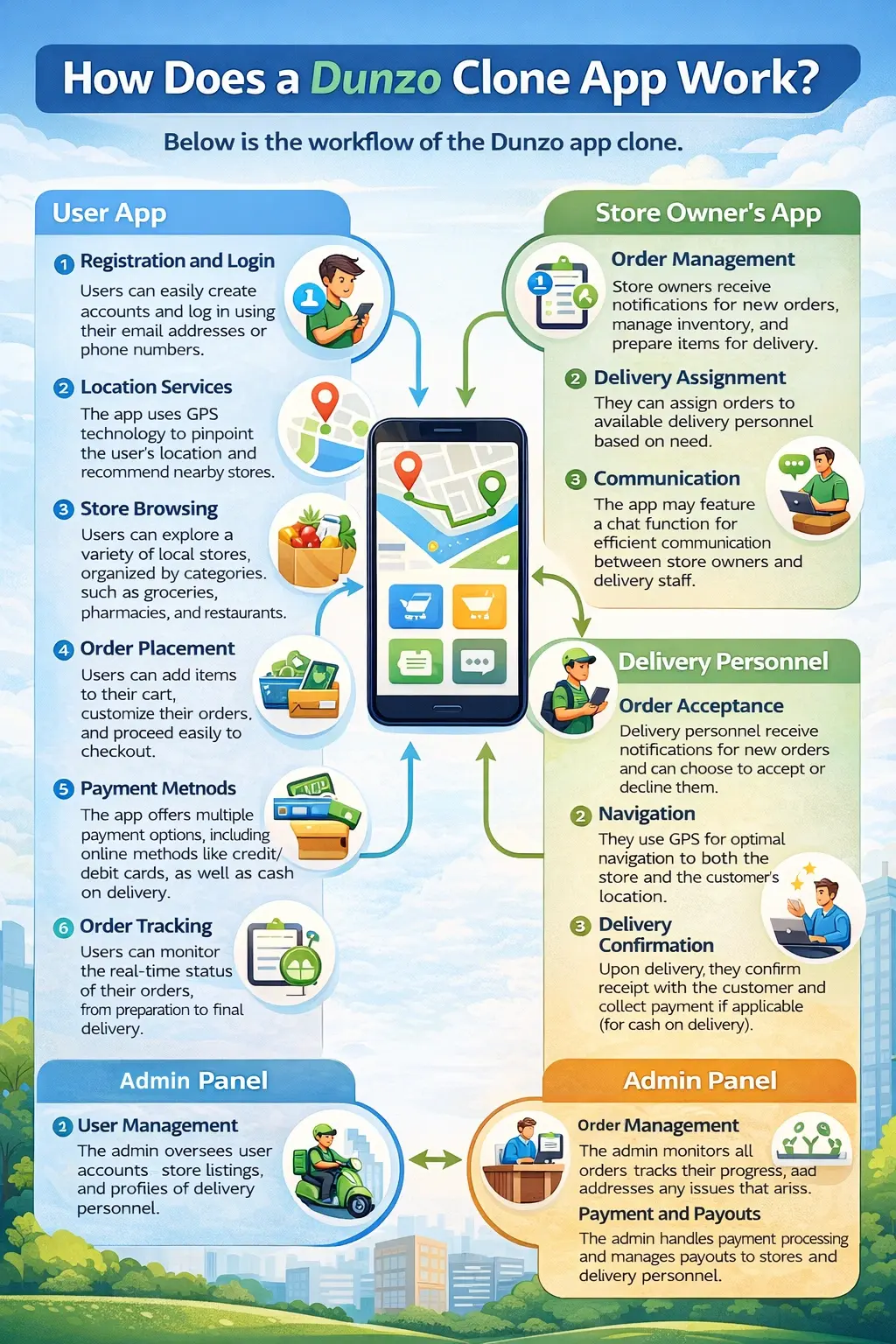
User App
- Registration and Login: Users can easily create an account and log in using their email address or phone number.
- Location Services: The app uses GPS technology to pinpoint the user’s location and recommend nearby stores.
- Store Browsing: Users can explore a variety of local stores, organized by categories such as groceries, pharmacies, and restaurants.
- Order Placement: Users can add items to their cart, customize their orders, and proceed easily to checkout.
- Payment Methods: The app offers multiple payment options, including online methods like credit/debit cards, as well as cash on delivery.
- Order Tracking: Users can monitor the real-time status of their orders, from preparation to final delivery.
- Reviews and Ratings: Users can rate and review both the stores and the delivery services.
Store Owner’s App
- Order Management: Store owners receive notifications for new orders, manage inventory, and prepare items for delivery.
- Delivery Assignment: They can assign orders to available delivery personnel based on need.
- Communication: The app may feature a chat function for efficient communication between store owners and delivery staff.
Delivery Personnel
- Order Acceptance: Delivery personnel receive notifications for new orders and can choose to accept or decline them.
- Navigation: They use GPS for optimal navigation to both the store and the customer’s location.
- Delivery Confirmation: Upon delivery, they confirm receipt with the customer and collect payment if applicable (for cash on delivery).
Admin Panel
- User Management: The admin oversees user accounts, store listings, and profiles of delivery personnel.
- Order Management: The admin monitors all orders, tracks their progress, and addresses any issues that arise.
- Payment and Payouts: The admin handles payment processing and manages payouts to stores and delivery personnel.
Why Build a Dunzo Clone App?
Look at the table below, which makes it easy to understand the benefits for anyone interested in building a Dunzo clone app.
| Benefits | Customers | Stores |
| Convenience | Customers can order items anytime, day or night, without leaving home. This makes life easier, especially during busy hours or bad weather. | Stores can operate longer hours without needing staff on-site all the time, reaching customers when it’s convenient for them. |
| Personalization | The app can suggest items based on what customers have bought before, making it easier to find what they like. | Stores can use customer data to create special offers or deals that match what their customers want, increasing sales. |
| Loyalty Programs | Customers can earn rewards or discounts for using the app often, encouraging them to keep ordering. | Stores can create loyalty programs that encourage repeat customers, boosting their sales and customer retention. |
| Real-time Tracking | Customers get live updates on where their orders are, so they know exactly when to expect their delivery. | Stores can manage their inventory better by understanding what’s being ordered and when, helping them stock efficiently. |
| Diverse Services | Customers can access a wide range of services, like grocery delivery, restaurant orders, and more, all in one app. | Stores can expand their offerings by including various services, attracting more customers who prefer convenience. |
| Feedback Mechanism | Customers can easily give feedback on their experience, helping improve the service. | Stores can receive valuable insights from customer feedback, allowing them to make necessary improvements. |
| Cost-Effectiveness | The app often provides competitive prices compared to traditional delivery services, saving customers money. | Stores can save on marketing costs by promoting their products directly within the app to a targeted audience. |
Features of the Dunzo Clone App
Below are the main features that you should incorporate in your on-demand Dunzo clone app.
Customer App Features
| Features | Description |
| Quick Sign-Up/Login | Customers can register easily using their phone number, email, or social accounts. It only takes a few seconds to get started. |
| Smart Search and Filters | The app lets customers find items quickly with intelligent search and filter options. This helps them shop faster without scrolling endlessly. |
| Schedule Your Delivery | Users can choose a specific time for their order to arrive. It adds convenience for busy people who want flexible delivery slots. |
| Repeat Past Orders | With one tap, customers can reorder items from their history. It’s especially useful for recurring purchases like groceries or meals. |
| Instant Notifications | Real-time alerts keep customers informed about order status, offers, and delivery updates. They’ll never miss important info. |
| In-App Chat Support | Customers can chat directly with their delivery rider or support team. It’s helpful for directions, queries, or sudden changes. |
| View Order History | All previous orders are saved for easy viewing and reordering. It’s handy for tracking spending or remembering favorite items. |
Merchant/Vendor App Features
| Features | Description |
| Easy Store Setup | Store owners can register, add products, and start selling in minutes. No technical skills required. |
| Add Products Easily | Merchants can upload products with names, prices, and photos. It’s simple to manage inventory from the dashboard. |
| Manage All Orders | Store owners can view, accept, prepare, and dispatch orders in real-time. Everything is handled from a single panel. |
| Create Discounts | Vendors can create special deals or promo codes to attract more customers. It helps increase visibility and sales. |
| Get Stock Alerts | The system notifies vendors when stock is low. This helps prevent running out of popular items. |
| Track Sales | Merchants can monitor daily sales, best-sellers, and revenue reports. It provides clear insights into business performance. |
| Multi-Branch Control | Stores with multiple locations can manage all branches from one dashboard. No need to switch accounts. |
Rider App Features
| Features | Description |
| Easy Registration | Riders can sign up by submitting basic documents through the app. The process is fast and paperless. |
| New Task Alerts | Delivery partners get instant notifications for new delivery tasks nearby. This helps them accept orders quickly and earn more. |
| Smart Navigation | The app provides turn-by-turn directions using built-in maps. It helps riders save time and avoid traffic. |
| Track Earnings | Delivery riders can see how much they’ve earned daily, weekly, or monthly. This brings transparency and motivation. |
| Order Status Update | Riders can update the order as picked up or delivered with one tap. It keeps customers informed in real-time. |
| Chat with Customer/Store | Riders can use in-app messaging to connect with the customer or store if there’s an issue or delay. |
| Flexible Payouts | Riders can withdraw their earnings to their bank account or wallet anytime. No need to wait for weekly or monthly payments. |
| View Ratings | Delivery partners can check their performance and customer feedback. It helps them improve and maintain high ratings. |
Admin Panel Features
| Features | Description |
| Manage All Users | The admin can manage all customer, merchant, and rider accounts. It gives full control over the platform. |
| Add Categories and Services | Admins can define categories like food, grocery, medicine, or courier. It allows platform flexibility for different business models. |
| Set Commission Rates | Admins can set how much commission is taken from each vendor or delivery partner. This supports flexible revenue models. |
| Set Delivery Zones | Admins can define areas where services are active. It helps manage operations city-wise or regionally. |
| Tax and Billing Reports | The system auto-generates billing reports and tax summaries. It’s useful for accounting and compliance. |
| Customer Support Panel | Admins can view and respond to customer complaints or tickets. This ensures high service quality across the platform. |
Steps for Building the Dunzo Clone App
Creating a Dunzo clone app takes careful planning, smart design, and strong development. Here are some steps to help you build a perfect app.
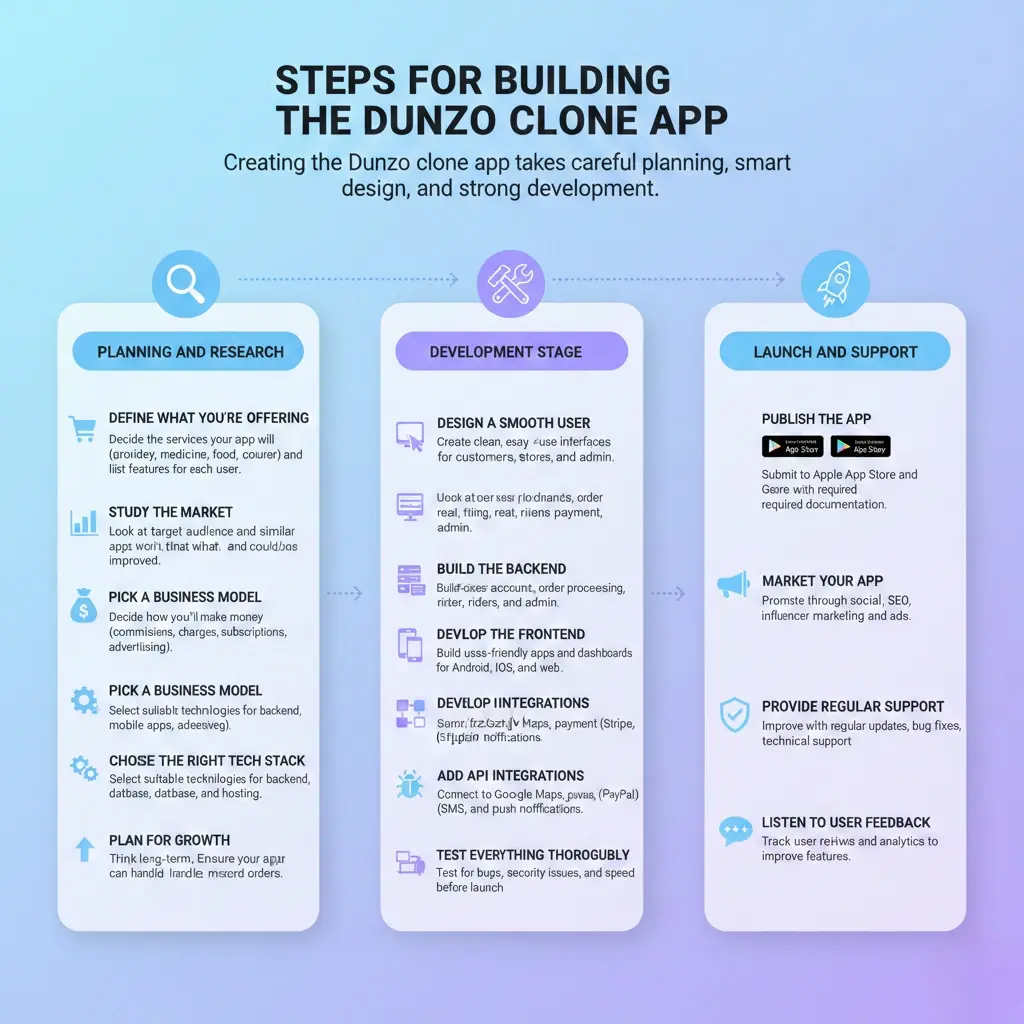
1. Planning and Research
- Define What You’re Offering
Decide the services your app will provide, like grocery delivery, medicines, food, or courier, and list the features for each user (customers, stores, delivery agents, and admin).
- Study the Market
Look at your target audience and what similar apps are doing. Find out what works well and what could be improved.
- Pick a Business Model
Decide how you’ll make money through commissions, delivery charges, subscriptions, or advertising.
- Choose the Right Tech Stack
Select suitable technologies for the backend, mobile apps, database, and hosting. Therefore, your app runs smoothly and is easy to scale.
- Plan for Growth
Think long-term. Make sure your app can handle more users and orders as your business grows.
2. Development Stage
- Design a Smooth User Experience
Create clean, easy-to-use interfaces for all users, customers, stores, riders, and the admin dashboard.
- Build the Backend
Set up the logic behind your app, including user accounts, order processing, real-time tracking, chat support, and payment systems.
- Develop the Frontend
Build user-friendly apps and dashboards, ensuring everything looks great and functions well on Android, iOS, and web.
- Add API Integrations
Connect your app to tools like Google Maps, payment gateways (Stripe, PayPal, etc.), SMS, and push notifications.
- Test Everything Thoroughly
Before launch, test your Dunzo clone script app for bugs, security issues, and speed to ensure everything works properly.
3. Launch and Support
- Publish the App
Submit your app to the Apple App Store and Google Play Store with all the required documentation and screenshots.
- Market Your App
Promote your launch through social media, SEO, influencer marketing, and ads to get users on board quickly.
- Provide Regular Support
Keep improving your app with regular updates, bug fixes, and technical support to ensure a smooth experience.
- Listen to User Feedback
Track user reviews and analytics to improve features and user satisfaction over time.
Cost for Building the Dunzo Clone App
The table below shows the estimated cost of the Dunzo clone app development.
| Component | Estimated Cost (USD) |
| UI/UX Design | $2,000 – $5,000 |
| Customer App (iOS + Android) | $7,000 – $15,000 |
| Delivery Partner App | $5,000 – $10,000 |
| Merchant/Vendor App or Panel | $4,000 – $8,000 |
| Admin Dashboard | $4,000 – $7,000 |
| Backend Development | $6,000 – $12,000 |
| Real-time GPS Tracking Integration | $1,500 – $3,000 |
| Payment Gateway Integration | $1,000 – $2,000 |
| Notifications (SMS, Email, Push) | $500 – $1,500 |
| Testing and QA | $2,000 – $4,000 |
| Deployment and Launch | $500 – $1,000 |
| Post-launch Support (3–6 months) | $2,000 – $4,000 |
Total Estimated Cost Range
| Development Type | Estimated Total Cost (USD) |
| MVP (Minimum Viable Product) | $20,000 – $30,000 |
| Full-featured Custom App | $35,000 – $60,000+ |
| Using Ready-made Clone Script | $5,000 – $15,000 (One-time license + customization) |
Supercharge your deliveries with Enatega.
Register NowConclusion
With the growing popularity of platforms like Dunzo, now is the perfect time to step into the on-demand delivery market. Whether it's groceries, medicines, food, or courier services, the demand for fast, reliable delivery solutions is only increasing.
If you're looking to turn your business idea into a high-performing app, consult Enatega. Our expert mobile app development team is here to help you.
Book a free demo with us today and start your journey toward success.
About the author

Hudaibia Khalid is the creative force behind the blog—a maestro of words and ideas. Her distinctive style not only imparts wisdom but also leaves an indelible mark, transforming each post into a captivating journey through her unique perspective on the world.
SHARE









 IOS
IOS Android
 Web
Web




