



Are you looking to create a customizable all-in-one delivery app for your business? If so, the PedidosYa clone is the perfect solution. This app can meet all your delivery needs and gives you complete control over your business.
As of January 2025, PedidosYa has an impressive annual revenue of $750 million. By developing a clone of this successful online food ordering and delivery service, you can make a powerful entrance into the market.
In this blog, we’ll explore the PedidosYa clone, a popular, ready-made, and customizable option for launching your delivery app. It’s a cost-effective way to get your digital delivery business up and running quickly.
Curious to learn more? Let’s dive in and get all the information about it.
What is a PedidosYa Clone?
A PedidosYa clone is an easy-to-use, customizable delivery platform that works just like PedidosYa. It helps customers find nearby restaurants and food places, allowing them to order their favorite meals quickly.
With a PedidosYa clone, both customers and restaurants enjoy a smooth and efficient food delivery experience.
Supercharge your deliveries with Enatega.
Register NowWhy Create the PedidosYa Clone App?
Below are some reasons that show why creating the PedidosYa clone is the best decision.
- Speedy Deliveries: With this food delivery clone app solution, customers can enjoy quick delivery right to their doorstep. No more waiting around for their favorite food.
- Order Management for Restaurants: Restaurants can easily process orders, making it more efficient to serve their customers. The intuitive interface allows them to manage everything effortlessly.
- Easy Delivery Management: Restaurants can easily assign delivery partners to make sure food gets to customers quickly.
Whether you’re a budding entrepreneur or an established restaurant looking to expand your delivery capabilities, the PedidosYa clone app offers the perfect blend of functionality and flexibility.
How does the White Label PedidosYa Clone Script Work?
The Pedidosya clone working process is similar to the Pedidosya app. Let us now look at the working process of the Pedidosya clone.
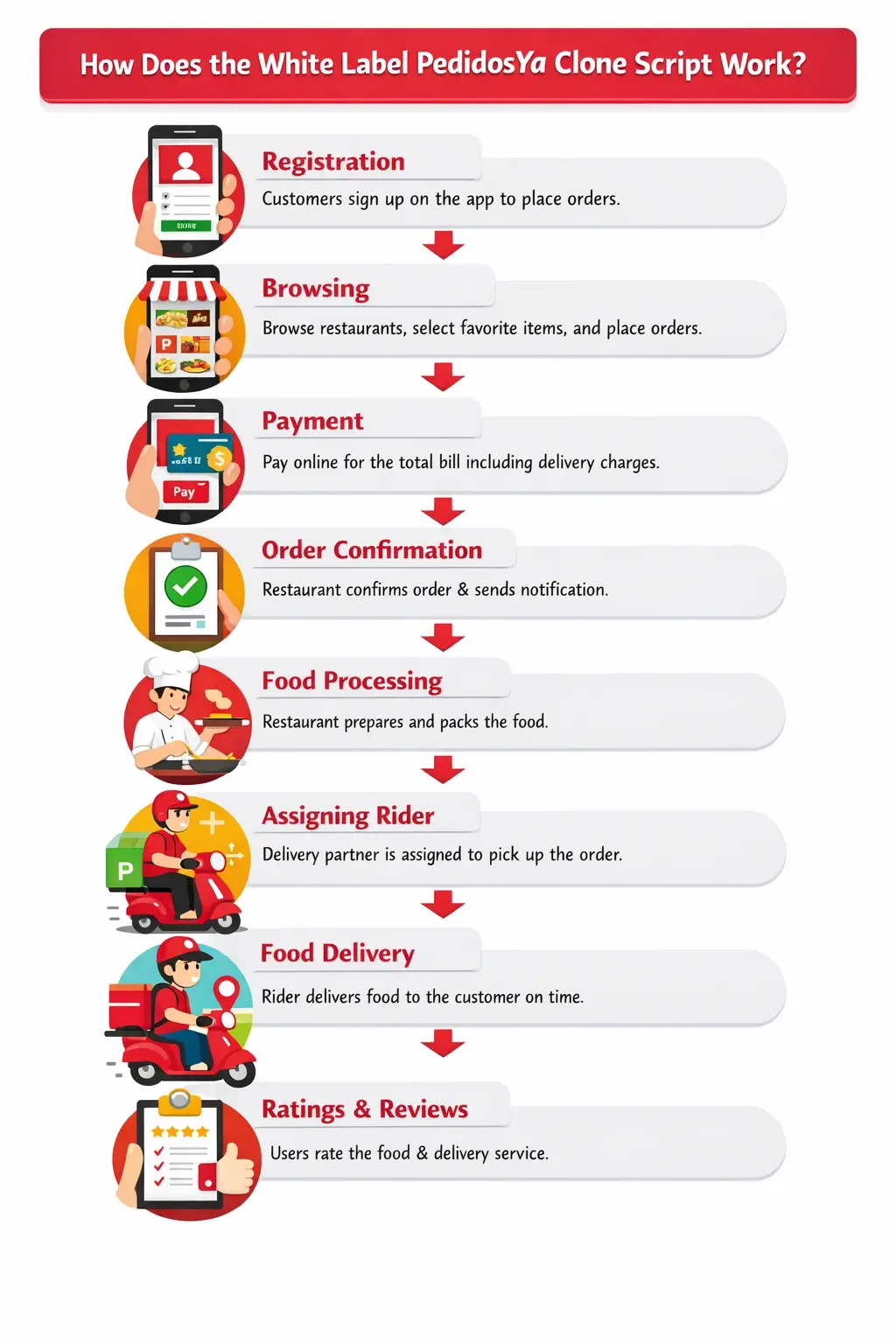
Registration: Customers sign up on the app to place orders.
Browsing: After registering, users can browse restaurant listings, choose their favorite items, and place orders.
Payment: Customers pay online for their total bill, which includes delivery charges, allowing the order to move forward.
Order Confirmation: Restaurants confirm the order after checking if the food is available. Users receive a notification confirming their order.
Food Processing: Restaurants prepare the ordered food and pack it for delivery.
Assigning Rider: The restaurant finds a delivery partner to pick up and deliver the food.
Food Delivery: The delivery partner uses GPS to locate the user and delivers the food on time.
Ratings and Reviews: Users rate the food and the delivery speed, helping restaurants improve and grow.
Revenue Models of PedidosYa Clone
Here are the revenue models of a PedidosYa clone app.
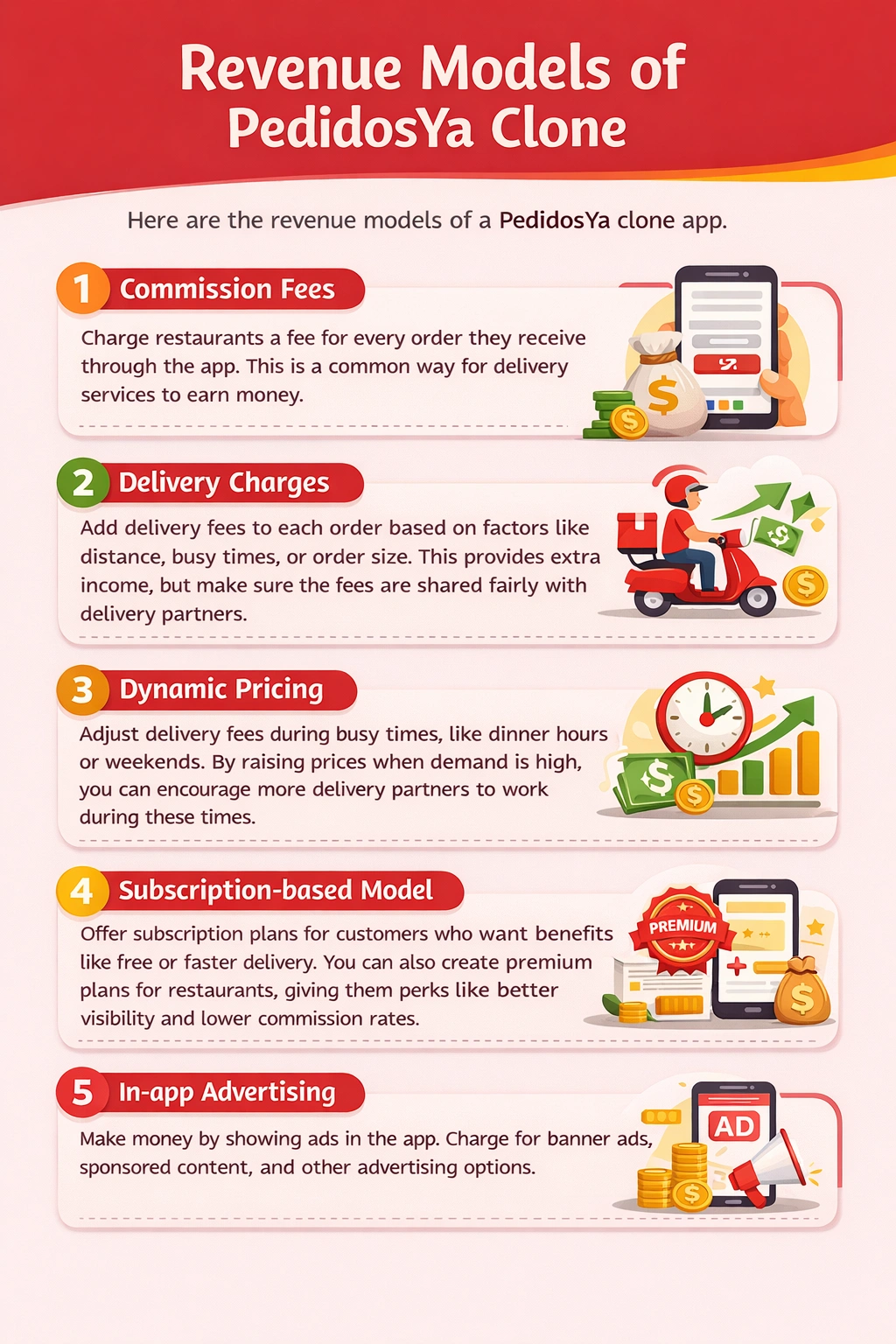
- Commission Fees
Charge restaurants a fee for every order they receive through the app. This is a common way for delivery services to earn money.
- Delivery Charges
Add delivery fees to each order based on factors like distance, busy times, or order size. This provides extra income, but make sure the fees are shared fairly with delivery partners.
- Dynamic Pricing
Adjust delivery fees during busy times, like dinner hours or weekends. By raising prices when demand is high, you can encourage more delivery partners to work during these times.
- Subscription-based Model
Offer subscription plans for customers who want benefits like free or faster delivery. You can also create premium plans for restaurants, giving them perks like better visibility and lower commission rates.
- In-app Advertising
Make money by showing ads in the app. Charge for banner ads, sponsored content, and other advertising options.
Features of PedidosYa Clone Script
A PedidosYa app clone contains customers, restaurants, delivery partners, and administrators.
Below are the features of each stakeholder.
For Customers
| Features | Description |
| Easy Registration | This feature makes it simple for users to sign up or log in to the app. They can easily create an account or access their existing one using just their email address and password. This straightforward process helps users get started quickly without any hassle. |
| Order Tracking | With the order tracking feature, customers can keep an eye on their orders in real-time. They receive updates on the status of their delivery, so they know exactly when to expect their food. This transparency helps reduce any uncertainty during the waiting period. |
| Advanced Search | Finding specific items or restaurants is made easy with the advanced search feature. Customers can look for their favorite dishes or dining options by filtering results based on cuisine type, location, price range, and customer ratings. This helps users quickly locate what they want without scrolling through endless options. |
| Multiple Payment Options | The online ordering app like PedidosYa offers multiple payment methods, including cash, card, and wallet options, to provide users with an easy and convenient ordering experience. These clones also often include features like “My Wallet” to track transactions and wallet-to-wallet money transfers. |
| Order History | To enhance the ordering experience, the app allows customers to view their past orders. |
| Ratings and Reviews | Customers can share their experiences through the ratings and reviews feature. This allows users to rate their delivery experience, the quality of the food from the restaurant, and even the performance of the delivery driver. |
| Scheduled Deliveries | This feature allows customers to plan their orders. Users can choose a specific time for their food to be delivered, which is especially handy for busy schedules or special occasions. This flexibility ensures that meals arrive exactly when they are needed. |
| Discounts and Promo Codes | To make ordering even more appealing, the app includes options for discounts and promo codes. Customers can apply these offers to their orders, helping them save money while enjoying their favorite meals. |
| Customer Support Chat | For any queries, the customer support chat feature provides quick assistance. Users can quickly reach out to support representatives through the app, ensuring that any concerns are addressed promptly. |
For Restaurants
| Features | Description |
| Order Management | Restaurants can easily manage their orders directly from the dashboard. This feature allows them to view, process, and track customer orders in real time, ensuring efficient service. |
| Menu Management | The menu management feature lets restaurants easily add, update, and edit their menu items. This ensures that they can quickly make changes based on availability or new offerings, keeping customers informed. |
| Inventory Management | With inventory management, restaurants can keep track of their stock levels. This feature helps them monitor ingredients and supplies, reducing the risk of running out of essential items. |
| Order Notifications | Restaurants receive instant notifications for new orders. This feature ensures that staff are always updated and can respond quickly to customer requests. |
| Business Hours Management | This feature of the food delivery clone app allows restaurants to set and manage their operating hours. They can specify when they are open for business, making it easier for customers to know when to place orders. |
| Customer Feedback | The feedback feature enables restaurants to gather reviews and suggestions from their customers. This valuable input helps them improve their services and menu offerings based on customer preferences. |
For Delivery Partners
| Features | Description |
| Quick Registration | The rider delivery app includes a simple registration feature that allows new riders to sign up effortlessly. |
| In-app Chat | This feature enables riders to communicate directly with customers or support. If riders have questions about an order or need assistance, they can use the in-app chat to get instant help. |
| Order Acceptance/ Rejection | As a delivery partner, they have the flexibility to choose which orders to accept or reject. This ensures they can manage their workload and only take on deliveries that fit their schedule. |
| Delivery History | The app keeps a record of all completed deliveries. Riders can easily review their delivery history to track their performance and see how much they’ve worked over time. |
| Available Status | Riders can set their availability status within the app. This lets customers know when riders are online and ready to accept orders. |
| Earnings Dashboard | The earnings dashboard provides a clear overview of income from deliveries. Riders can see how much they’ve earned over different periods, making it easier to manage their finances. |
| Order Pickup Details | This feature of the food rider app gives riders all the information they need for each order pickup. They’ll receive details about the pickup location, the items to collect, and any special instructions, ensuring smooth and efficient deliveries. |
For Administrators
| Features | Description |
| User Management | From the admin dashboard, you can easily oversee all user accounts. This includes creating new accounts, editing existing ones, and managing user permissions. |
| Content Management | This feature allows you to manage all the content on your platform. You can add, edit, or delete articles, images, and videos. Additionally, you can organize content into categories to improve navigation for users. |
| Revenue Tracking | Keep track of your platform’s financial performance with the revenue tracking feature. This tool enables you to monitor income from various sources, such as subscriptions or sales, and provides detailed reports. |
| Order Analytics | Get information into customer orders with the order analytics feature. You can analyze sales trends, track order fulfillment, and identify popular products. This information helps you make informed decisions to improve your offerings. |
| Customer Support Management | Efficiently manage customer inquiries and support requests through this feature. You can assign tickets to support staff, track response times, and ensure that all customer concerns are addressed on time. |
How to Build a PedidosYa Clone App?
Below are some steps to help you build the PedidosYa clone app.
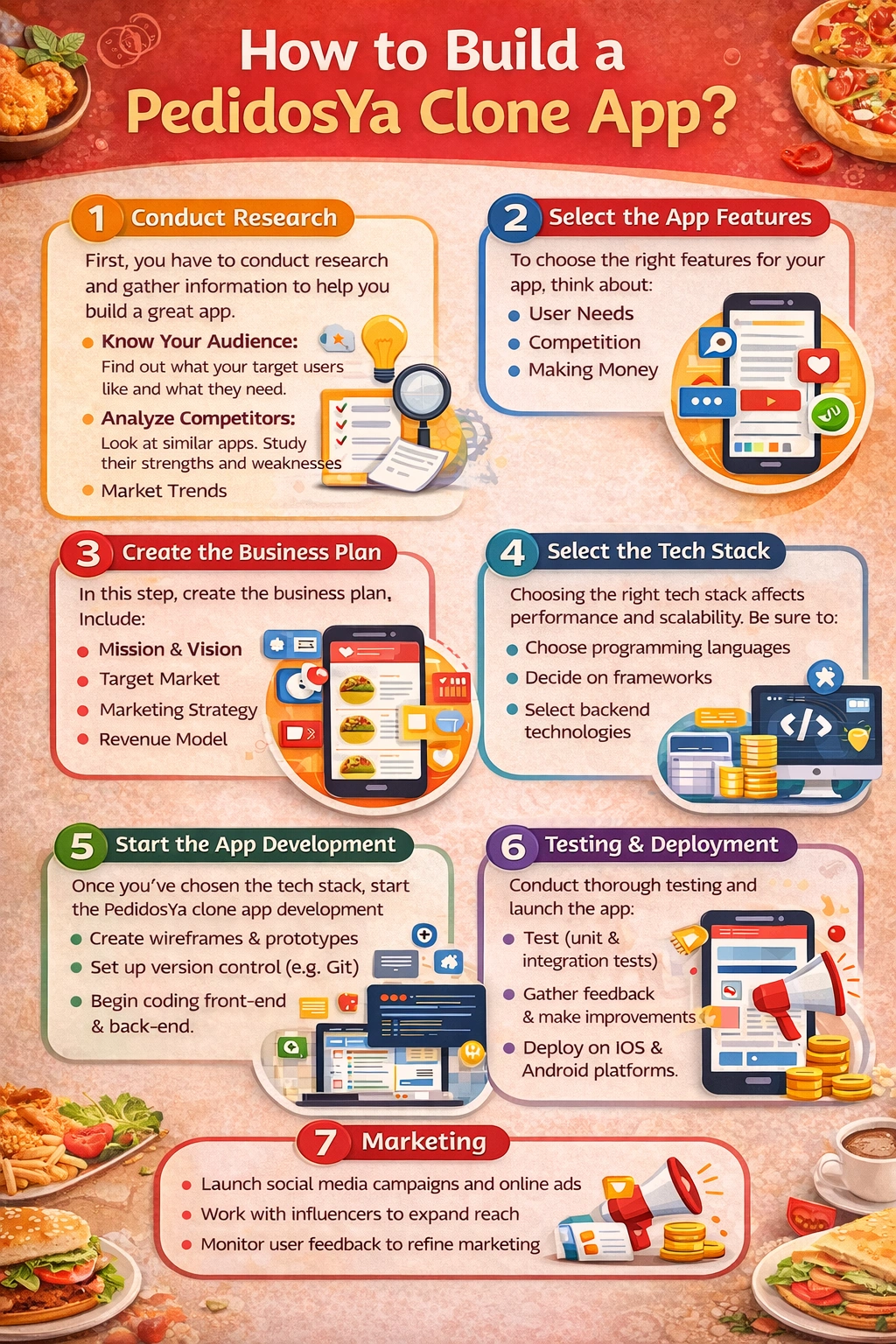
1. Conduct Research
First, you have to conduct research and gather all the information to help you build a great app. In this phase, you can gather this kind of information:
- Know Your Audience: Find out what your target users like and what they need.
- Analyze Competitors: Look at similar apps. What do they do well? Where do they fall short? Check their pricing too.
- Market Trends: Stay updated on what’s popular in the market right now.
This research will help you create a successful food clone app.
2. Select the App Features
To choose the right features for your app, think about:
- User Needs: What do users want or need?
- Competition: What are similar apps doing?
- Making Money: How can the app earn money?
Start with features that solve user problems and offer something special. Focus on the main functions first, then add extra features to improve the user experience.
3. Create the Business Plan
In this step, create the business plan. In the business plan, add these things:
- Define your app’s mission and vision.
- Identify your target market and customer segments.
- Outline your marketing strategy, including how you will attract users.
- Detail your revenue model and predict potential earnings.
- Include a timeline for development and launch phases.
4. Select the Tech Stack
Choosing the right tech stack is essential for successful app development. A good tech stack can affect your app’s performance, scalability, and overall success. Be sure to:
- Choose programming languages (e.g., JavaScript, Python).
- Decide on frameworks (e.g., React Native for mobile development).
- Select backend technologies (e.g., Node.js, Django) and databases (e.g., MongoDB, PostgreSQL).
- Ensure the tech stack is scalable and secure to handle user data and transactions.
5. Start the App Development
Once you’ve chosen the tech stack, start the PedidosYa clone app development. During this phase, you need to do the following:
- Create wireframes and prototypes to visualize the app layout and user flow.
- Set up version control (e.g., Git) for code management.
- Begin coding, focusing on the front-end and back-end development simultaneously.
6. Testing and Deployment
Conduct thorough testing (unit tests, integration tests, and user acceptance tests). Gather feedback from beta users to identify issues and make improvements.
After testing, prepare for deployment by choosing a reliable hosting service and setting up app store accounts. Launch the app on platforms like iOS and Android.
7. Marketing
In this step, follow these simple tips:
- Develop a marketing strategy that includes social media campaigns, influencer partnerships, and online ads.
- Create engaging content (blogs, videos) to drive interest and educate potential users.
- Encourage user reviews and referrals to build credibility.
- Monitor user feedback post-launch to make iterative improvements.
By following these detailed steps, you can effectively plan and execute the development of a successful food delivery app like PedidosYa.
Cost of Creating the PedidosYa Clone App
The cost of creating the PedidosYa clone app can range from $30,000 to $150,000 or even higher. It depends on complexity, features, and whether you build it from scratch or use a ready-made solution.
The table below shows the estimated costs associated with creating a PedidosYa clone app.
| Factor | Cost Range |
| Basic Features | $30,000 – $50,000 |
| Advanced Features | $50,000 – $100,000 |
| Custom Development | $100,000 – $150,000+ |
| Ready-Made Solution | $10,000 – $30,000 |
| Ongoing Maintenance | $500 – $2,000/month |
Supercharge your deliveries with Enatega.
Register NowConclusion
The PedidosYa clone app is a great investment for entrepreneurs looking to start a delivery business. It allows new business owners to launch a competitive all-in-one delivery app without the hassle of custom development.
With a PedidosYa app clone, you get a quick entry into a profitable market, whether in a small town or a big city. This app gives you a solid foundation to build a successful delivery service.
You can create it with the help of Enatega. Our team of developers has experience in building apps similar to DoorDash, Foodpanda, and more.
Book a free demo with us today and get the Pedidosya app clone with advanced features at an affordable price.
About the author

Hudaibia Khalid is the creative force behind the blog—a maestro of words and ideas. Her distinctive style not only imparts wisdom but also leaves an indelible mark, transforming each post into a captivating journey through her unique perspective on the world.
SHARE










 IOS
IOS Android
 Web
Web




