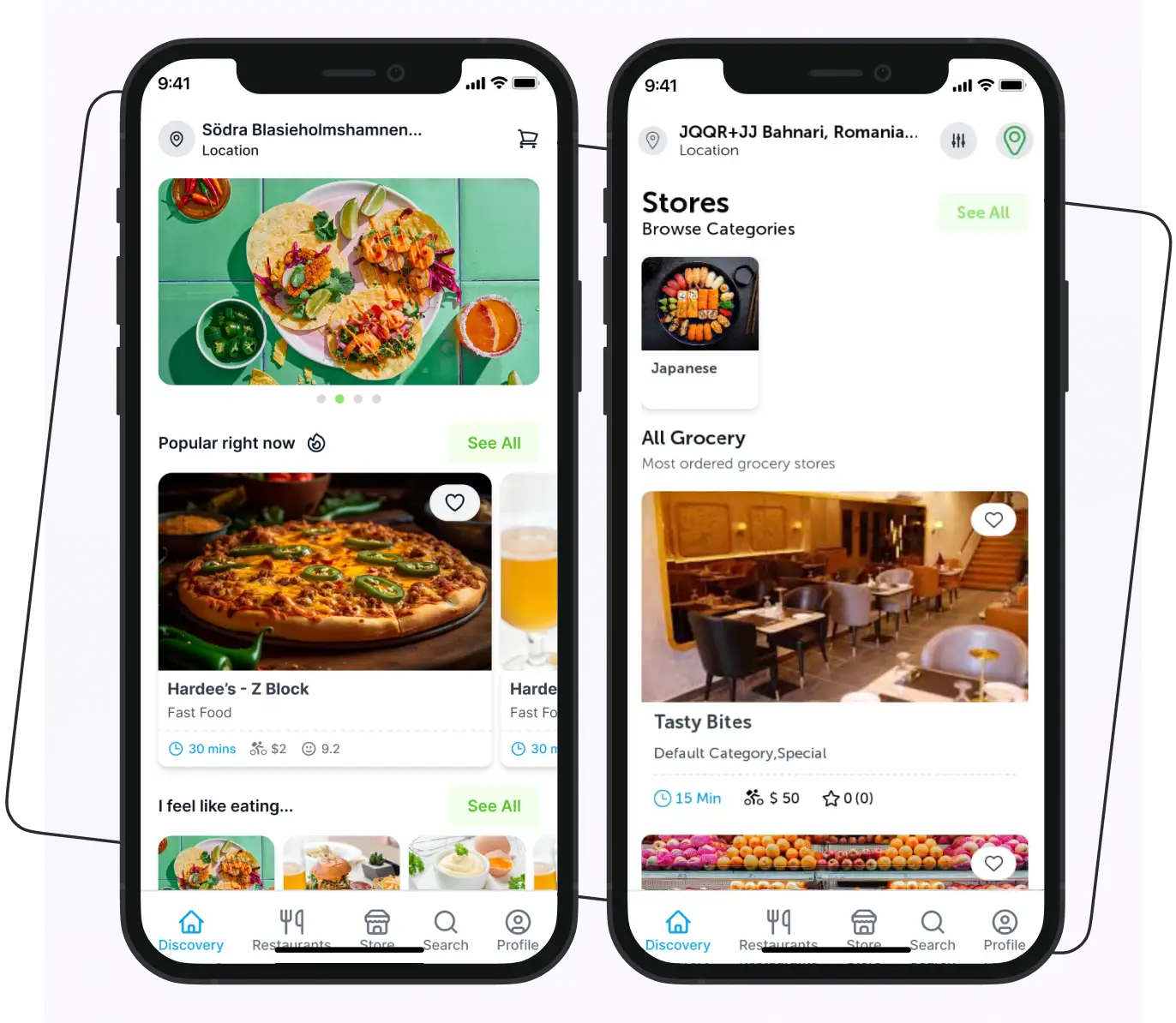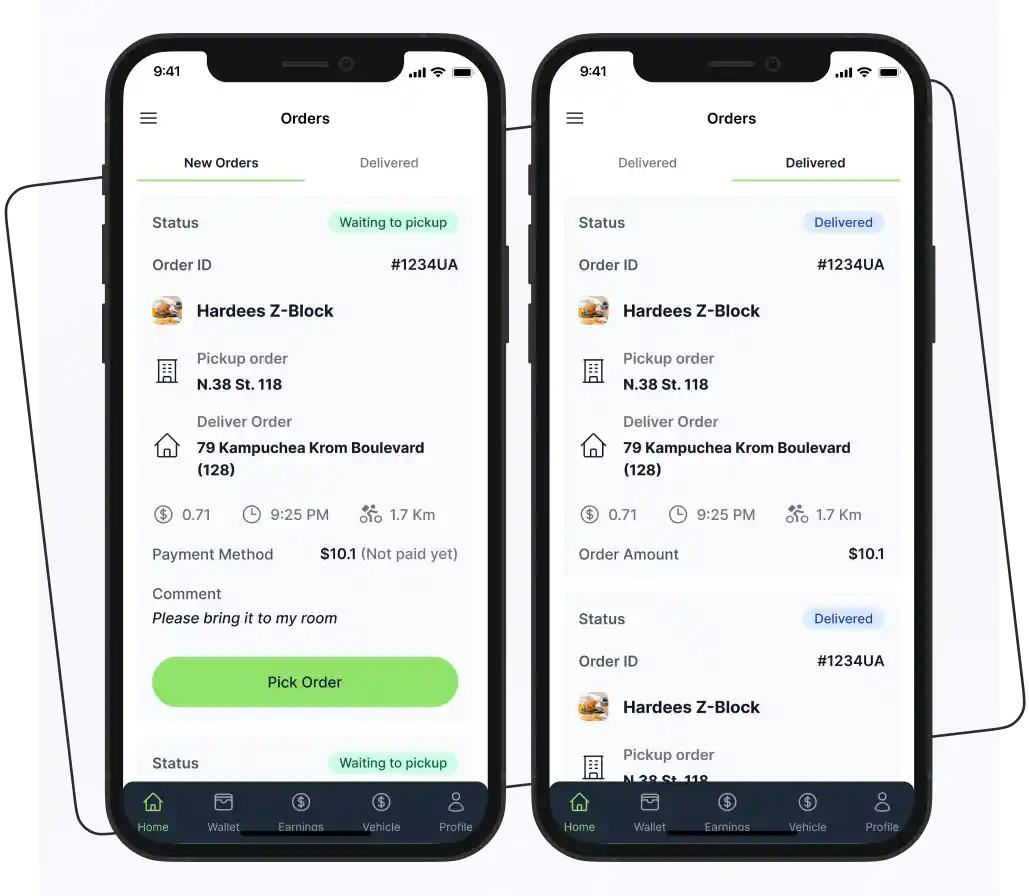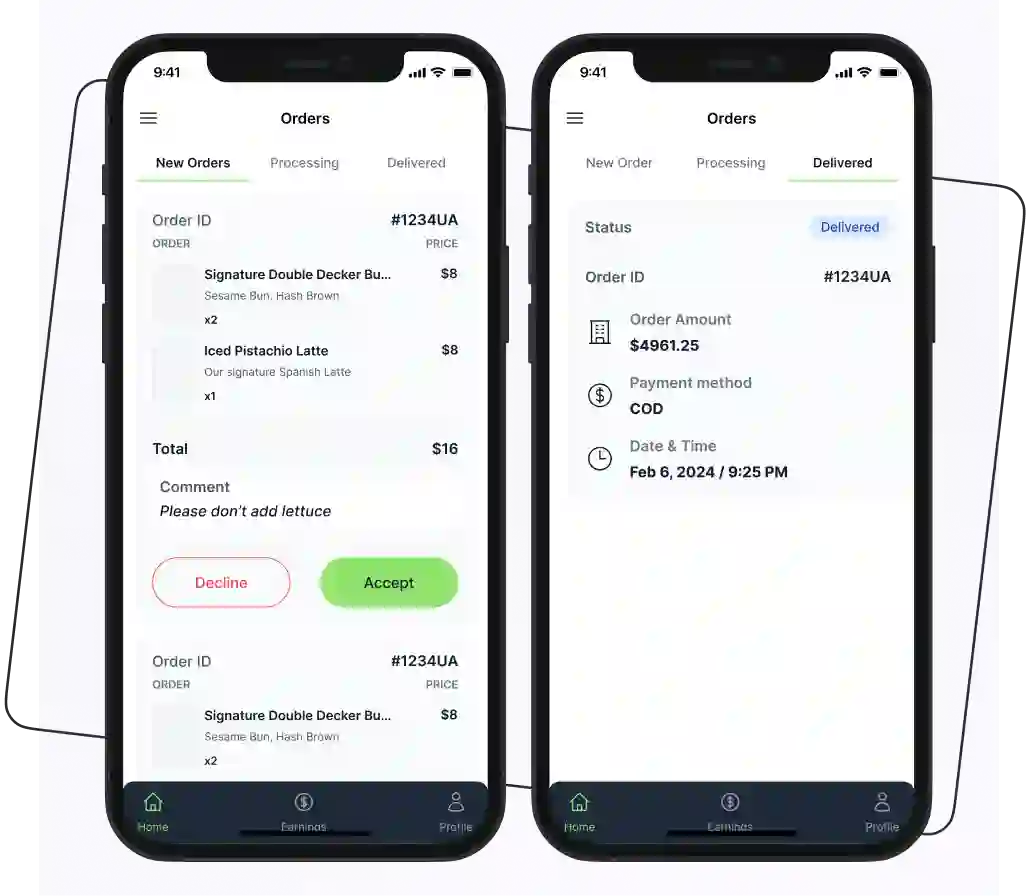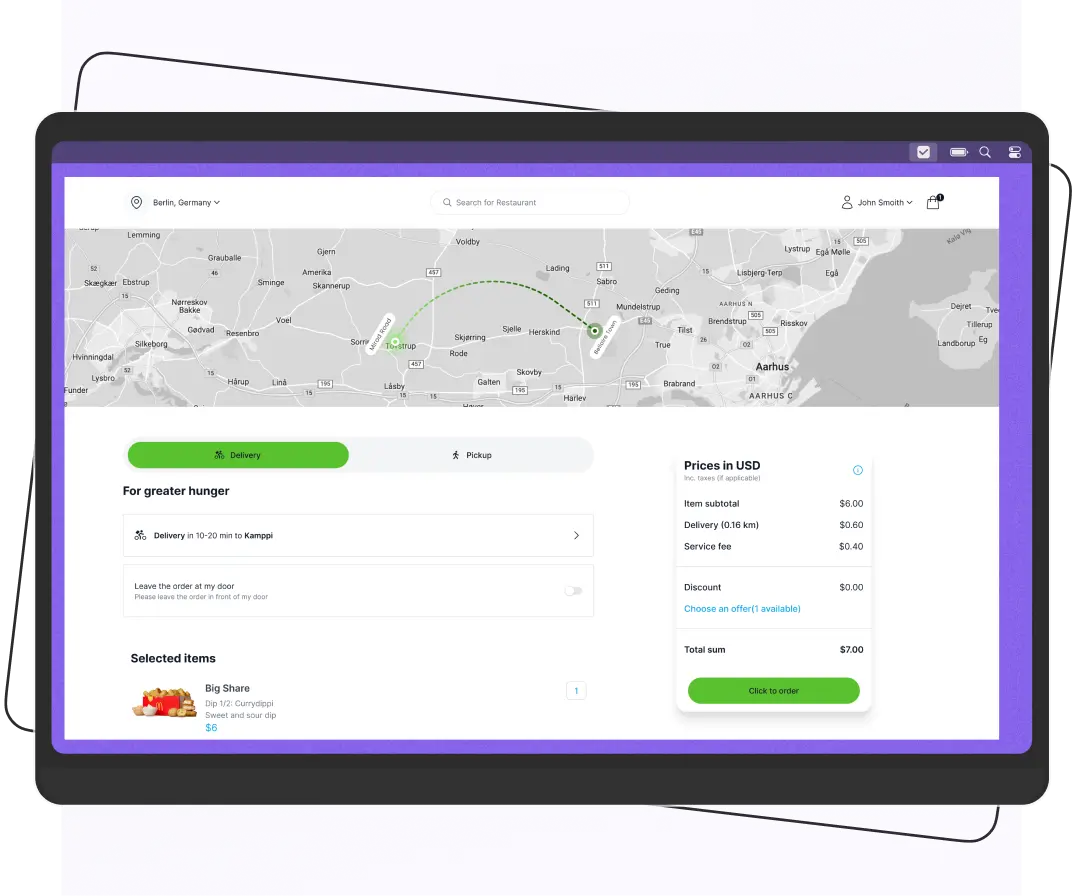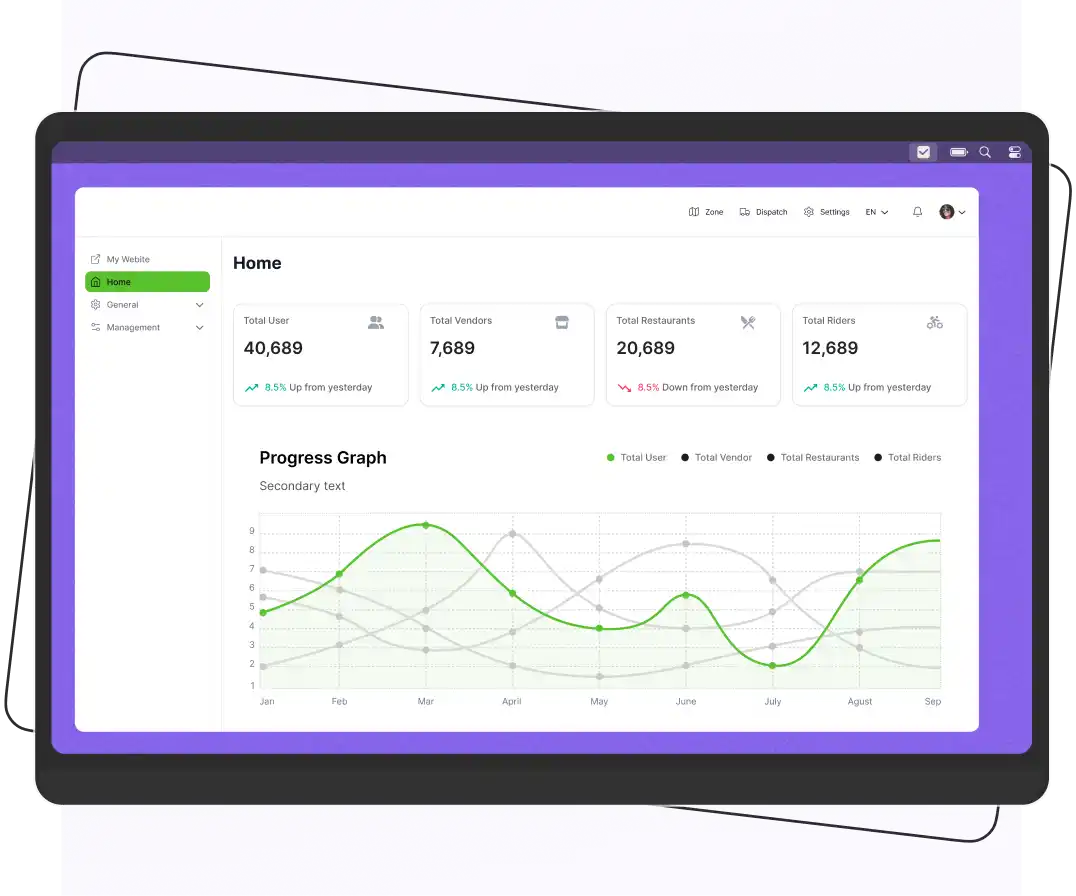


To build an Uber Eats clone app, start by defining your business model and target audience, then identify essential features for customer, restaurant, rider, and admin apps. Choose a suitable technology stack, design the interfaces, develop the apps and backend, and integrate payment gateways, GPS tracking, notifications, and order management. Test the platform before launching and provide ongoing maintenance.
The estimated cost ranges from $20,000 to $150,000+, depending on the app’s complexity, features, platforms, and integrations. A basic app may cost $20,000–$50,000, a mid-range solution $50,000–$150,000, and an advanced custom platform can exceed $150,000.
Online food delivery has created new opportunities for restaurants, entrepreneurs, and businesses looking to enter the digital marketplace.
According to Grand View Research, the global online food delivery market was estimated at $355.6 billion in 2026 and is projected to reach $505.5 billion by 2030, growing at a CAGR of 9.4% from 2025 to 2030.
This growth creates opportunities for businesses to launch their own food delivery platforms like Uber Eats and serve customers through digital ordering channels.
An Uber Eats clone app can help you launch a food delivery platform without developing every feature from scratch.
So, explore how to build an app like Uber Eats without breaking the bank.
What is Uber Eats?
Uber Eats is an online food and grocery delivery platform operated by Uber Technologies. It connects customers with restaurants and local merchants through its website and mobile applications, allowing users to browse products, place orders, make payments, and track deliveries.
Uber Eats operates in more than 6,000 cities across 45 countries. Its marketplace connects three primary participants:
- Customers: Browse restaurants, explore menus, place orders, make payments, and track deliveries.
- Restaurants and merchants: List their products, receive customer orders, manage menus, and prepare orders for pickup or delivery.
- Delivery partners: Receive delivery requests, collect prepared orders, and transport them to customers.
The platform provides a useful business model for entrepreneurs who want to understand how an online food delivery marketplace operates. Businesses can use similar marketplace functionality to develop their own branded food delivery applications, with customized features, pricing structures, and delivery operations.
How Does Uber Eats Work?
Below are some steps that show the workflow of Uber Eats.
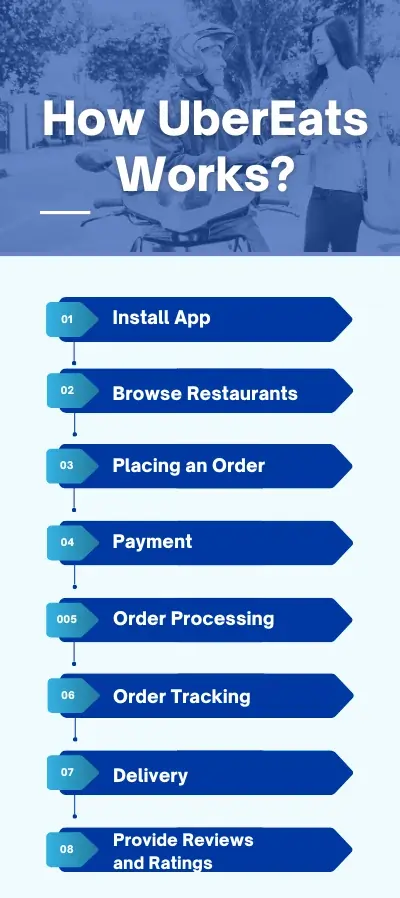
1. Install App
First, users must download the Uber Eats app on mobile phones or tablets. For iOS devices, use the App Store; for Android devices, use the Google Play Store. After installing the app, users create an Uber Eats account.
Creating an Uber Eats account simplifies the ordering process. Users can easily place their orders from their favorite restaurants.
With the help of an account, users can customize orders and manage them according to their dietary restrictions. These choices are saved, ensuring that their next orders are exactly what they want.
2. Browse Restaurants
Users can easily browse several restaurants. Each restaurant has its own menu with prices, ratings, and reviews. The app layout is easy to use, and you can effortlessly choose the food items from the menu.
3. Placing an Order
Users can easily place an order from the restaurant menu. Also, customize the order according to specific instructions.
4. Payment
Once the order is confirmed, users proceed to the next step of paying the bill. Customers pay in the app. Available methods depend on the country and can include credit and debit cards, digital wallets, and, in some markets, cash on delivery.
5. Order Processing
After completing the order and payment, the restaurant receives the order and prepares the food.
6. Order Tracking
Users can track the progress of their order and get updates about:
- When is the food prepared?
- When does the deliverer pick up the food?
- When does the deliverer deliver the food?
7. Delivery
When the order is picked up, the rider follows in-app navigation to the customer’s drop-off address. Customers can track the rider’s location and may be able to contact the rider through the app. The platform masks phone numbers for privacy.
8. Provide Reviews and Ratings
After receiving the order, users can provide feedback and rate it. These reviews help other customers make a better decision.
Supercharge your deliveries with Enatega.
Book a callUber Eats Revenue Model: How Does the Platform Make Money?
A platform like Uber Eats can generate revenue through several channels, such as:
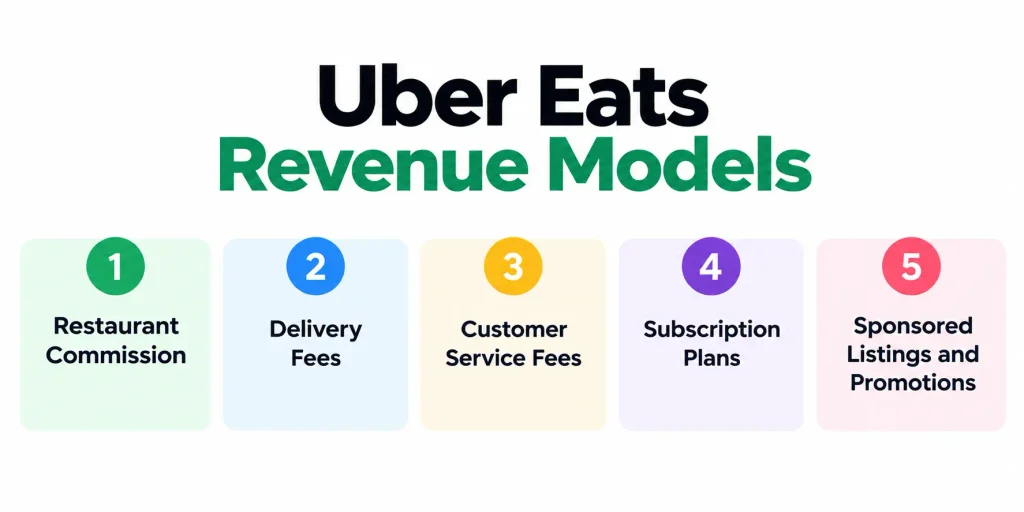
1. Restaurant Commission
Charge partner restaurants a percentage of each order placed through your platform. For example, a 15% commission on a $40 order generates $6 in platform revenue.
2. Delivery Fees
Charge customers a delivery fee based on distance, order value, or delivery conditions. This can help cover rider expenses and support delivery operations.
3. Customer Service Fees
Add a small service fee at checkout to help cover payment processing, platform operations, and customer support costs.
4. Subscription Plans
Offer monthly plans with benefits such as reduced delivery fees, exclusive deals, or priority support. Subscription revenue can create a recurring income stream.
5. Sponsored Listings and Promotions
Allow restaurants to pay for featured placement, promotional banners, or sponsored visibility within the app.
What is Uber Eats Clone App Script?
An Uber Eats clone app script is a pre-built software solution that provides the core functionality of an online food delivery marketplace. It includes applications for customers, restaurants, delivery partners, and administrators, allowing a business to manage ordering, payments, deliveries, and marketplace operations.
Rather than copying Uber Eats’ proprietary software, a legitimate clone solution uses its own code and branding while following a similar food delivery business model. Businesses can customize the platform to suit their target market, service area, pricing structure, and operational requirements.
Depending on the provider, an Uber Eats clone solution may be offered in three forms:
1. Pre-Built Clone Script
A clone script is an existing software package that businesses can license or purchase. It may include source code and pre-developed applications, but the buyer may need to arrange hosting, installation, configuration, integrations, and deployment. Check the licensing terms to understand whether you receive source code ownership or permission to use the software.
2. White-Label Food Delivery Software
A white-label platform allows businesses to launch a food delivery service under their own brand using an existing software product. Depending on the provider, it may include branded customer, restaurant, and rider apps, an admin dashboard, and ongoing technical support. Customization options, hosting arrangements, and pricing vary by provider.
3. Custom Food Delivery App Development
Custom development involves designing and building a food delivery platform around specific business requirements. It offers greater control over the user experience, features, integrations, and technical architecture, but generally requires more development time, resources, and budget.
4. Hybrid Approach
Start with a white-label platform to launch faster and establish your operations. As your business grows, add custom modules for specific requirements, such as tailored dispatch workflows, unique pricing models, or specialized features. This approach combines a faster time to market with the flexibility to build a platform around your business needs.
Business Ideas You Can Build With a Delivery Platform
Below are the services you can offer with the Uber Eats clone model.
- Grocery delivery service
- Flower delivery
- Alcohol delivery
- Home essentials delivery
- Milk delivery
Is it Legal to Build an App Like Uber Eats?
Businesses can develop food delivery apps based on a similar marketplace model, but they should create their own software implementation, branding, and user experience. Using Uber’s name, logo, copyrighted content, proprietary code, or other protected assets without authorization can create intellectual property issues.
For example, Apple rejects apps that copy another app’s identity or impersonate an existing service. Google Play also prohibits apps that infringe third-party intellectual property rights.
Before purchasing a clone script or hiring a development company, verify that the provider has the rights to distribute the software and that your license clearly explains what you can modify, use, and own.
Clone Script vs. White-Label vs. Custom App: Which Should You Choose?
The table below shows the comparison to help you make a better decision.
| Factor | Clone Script | White-Label | Custom App |
| Upfront cost | Lowest | Low to medium | Highest |
| Time to launch | Weeks | Weeks | Months |
| Customization | Depends on source-code access | Branding and configuration, limited code changes | Full control |
| Scalability | Depends on the code quality and architecture | Depends on the provider | Designed around your needs |
| Maintenance | You manage it unless the license includes support | Often handled by the provider | You or your dev team |
How to decide: If you want to test a market quickly, start with a white-label or clone solution. If your business depends on a unique workflow, such as custom dispatch logic or a new pricing model, go custom. Many businesses start with a pre-built platform and add custom modules as they grow.
Features of Uber Eats Clone App
The Uber Eats clone app is designed to replicate the functionality and features of the famous food delivery app. Below are some of the main features of the clone app.
Admin Panel
| Features | Description |
|---|---|
| Customer Management | The admin can view the buyer’s information, the number of orders, the date and time, and the total number of orders. |
| Restaurant Management | Allows the admin to add new restaurants and remove old ones. Also, helps them to maintain and manage them flexibly. |
| Feedback Management | The admin can manage and view the comments from customers and the answers from the restaurant and delivery boys. |
| Revenue Management | From the Uber Eats admin login, you can easily manage all the payments without any hassle. |
| Offer Management | Easily add new offers, promotions, deals, and discounts. |
| Database Management | Maintain all information safely related to customers, restaurants, delivery boys, etc. |
| Notifications | Manage app notifications, emails, and messages. Plus, it can easily manage information related to restaurant owners and more. |
Customer App
| Features | Description |
|---|---|
| Browse the Menu | Customers can easily browse several restaurant menus and their prices. |
| Select the Order | Customers can select the restaurant, select the order, and place it. |
| Check the Cart | Place the order by putting the item you want in your cart. |
| Search Restaurants | Finding restaurants is easy according to the location, timing, and cuisine. |
| Get Notifications | Customers get notifications about new features, offers, and restaurants. |
| Payment Mode | Provides customers with various payment options, which include credit cards, debit cards, and other secure payment methods. |
| Order Tracking | Offers the facility to track your orders in real time. |
| Feedback and Rating | Customers can provide feedback and rate the service. |
| Advanced Security Measures | Uses advanced security measures that keep all customer information safe from any cyber threat. |
Restaurant App
| Feature | Description |
| Restaurant Profile Management | Allow restaurant owners to manage their business name, address, contact details, operating hours, and profile information. |
| Menu Management | Add, edit, or remove food items, update prices, upload images, and mark items as available or unavailable. |
| Order Management | Receive incoming orders, accept or reject requests, and mark orders as ready for pickup. |
| Order Notifications | Receive alerts for new orders, cancellations, and order-status updates. |
| Earnings and Payouts | View sales summaries, transaction records, and payout history. |
| Order History | Review previous, ongoing, cancelled, and completed orders. |
| Promotions and Discounts | Create or manage eligible offers, discounts, and promotional campaigns. |
| Customer Reviews | View customer ratings and feedback and respond where the platform supports it. |
| Operating Hours and Availability | Set business hours, update preparation times, and temporarily pause incoming orders when necessary. |
Rider App
| Feature | Description |
| Rider Registration and Profile | Allow delivery partners to register, submit required details, and manage their profiles. |
| Availability Management | Let riders switch their availability on or off to indicate whether they can receive delivery requests. |
| Order Requests | Notify riders about available deliveries and display relevant pickup and delivery details. |
| Order Acceptance | Allow riders to accept or decline delivery requests, depending on the platform’s dispatch rules. |
| GPS Navigation | Provide navigation to restaurant pickup locations and customer delivery addresses. |
| Delivery Status Updates | Let riders update order statuses, such as accepted, picked up, and delivered. |
| Delivery History | Allow riders to review previous deliveries and their associated details. |
| Notifications and Support | Send alerts about new requests, delivery changes, and important updates, with access to support when needed. |
Advanced Features of Uber Eats Clone App
Below is a list of some new and advanced features that should be included in the Uber Eats app clone and make your app unique among competitors.
| Features | Description |
| Group Ordering | This feature allows customers to split the cost of a meal and order from the same restaurant. |
| Order Scheduling | Allow users to place orders in advance for a future date and time. This is especially useful for planning events, busy schedules, or avoiding peak rush hours. |
| Subscription Services | Introduce subscription options for recurring orders, allowing users to automatically receive their favorite meals regularly. |
| Personalized Recommendations | Use user data and AI algorithms to provide personalized meal recommendations based on past orders, preferences, dietary restrictions, and location. |
Steps to Build a Food Delivery App Like Uber Eats
Here are some steps to help you develop a successful food delivery app like Uber Eats.
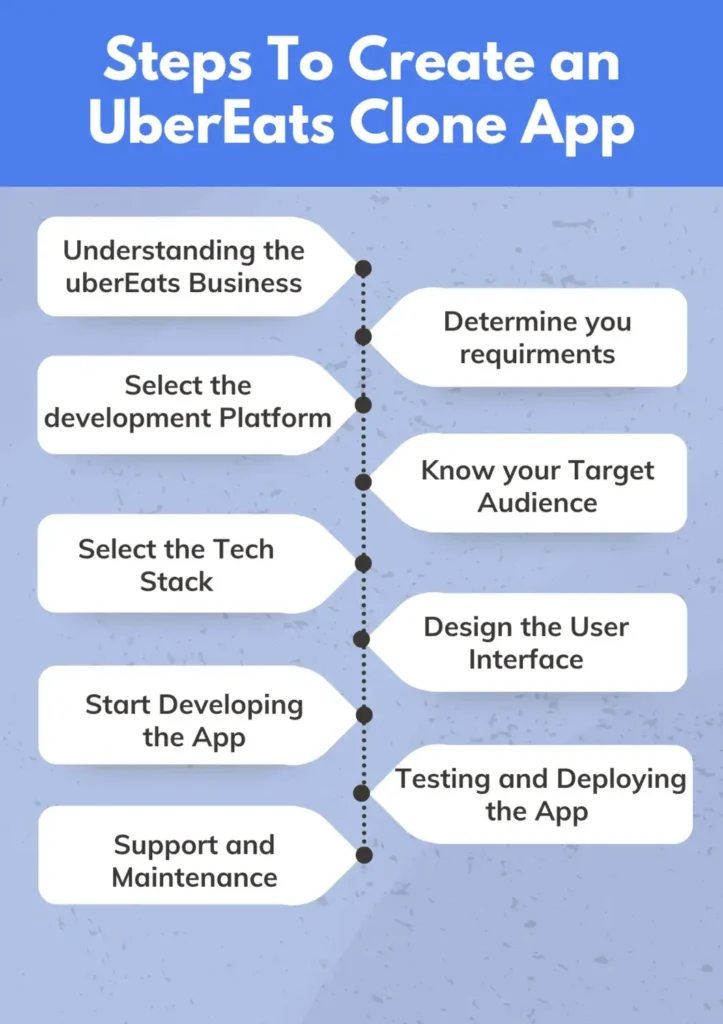
1. Know Your Target Audience
Decide who you’re serving before you build. Your audience shapes your features, pricing, and marketing. Answer these questions:
- Who are they? Age, income, location, and how they order food today.
- What do they need? Speed, price, healthy options, specific cuisines, or groceries and alcohol.
- Who else serves them? Which delivery apps operate in your area, and what do users complain about in their reviews?
- Why would they choose you? For example: lower restaurant commissions, niche cuisine, faster delivery in a specific district.
2. Define Your Food Delivery Business Model
Start by deciding how your platform will generate revenue and manage order fulfillment. Your business model determines the applications, features, payment workflows, and delivery operations you need.
Common food delivery business models include:
- Order-only model: Customers place orders through your platform, and restaurants handle delivery themselves.
- Order and delivery model: Your platform manages both restaurant orders and delivery through its rider network or delivery partners.
- Fully managed marketplace: Your business manages customer ordering, restaurant partnerships, delivery operations, and platform transactions.
Also identify:
- Your target market
- Service locations
- Restaurant categories
- Delivery coverage
- Pricing strategy before development begins
3. Determine Your Requirements
You have to determine your requirements before starting the development process. You need to know what features would add to the Uber Eats clone app.
Also, identify the applications you need. A multi-vendor food delivery platform generally requires four connected components:
- Customer app
- Restaurant app
- Rider app
- Admin panel
Define the responsibilities of each application and how information should move between them.
4. Select the Development Platform
After determining your requirements, you now have to choose the development platform according to your requirements and budget. iOS and Android are the two most popular platforms for developing mobile apps.
You might also opt for cross-platform development using React Native or Flutter. These tools enable the creation of applications compatible with iOS and Android.
5. Select the Tech Stack
The tech stack provides a solid foundation for building an Uber Eats clone application.
A possible technology stack for a food delivery platform includes:
| Technology | Purpose |
| React Native or Flutter | Cross-platform customer, restaurant, and rider mobile applications |
| React.js | Web-based admin dashboard |
| Node.js and Express.js | Backend services and application logic |
| GraphQL or REST APIs | Communication between applications and backend services |
| MongoDB or PostgreSQL | Storing customer, restaurant, order, and transaction data |
| Google Maps APIs | Location services, maps, and route information |
| Firebase Cloud Messaging | Push notifications and order updates |
| Stripe or PayPal | Payment processing, depending on market availability |
The final stack should be selected based on your technical requirements. For example, a platform with complex reporting and financial transactions may need a different database than a smaller single-city MVP.
6. Design the User Interface
Create interfaces that make ordering and delivery management simple for each user group.
The customer app should make restaurant discovery, menu browsing, checkout, and order tracking easy. Restaurant interfaces should prioritize incoming orders and preparation workflows, and rider interfaces should provide clear delivery instructions and navigation.
Design the admin dashboard around operational tasks such as managing users, monitoring orders, reviewing transactions, and handling customer complaints.
Before development, prepare wireframes and interactive prototypes to test the main user journeys and identify usability issues.
7. Start Developing the App
Once the design and technical requirements are finalized, begin developing the customer, restaurant, rider, and admin applications. Build the backend to manage:
- User accounts
- Restaurant listings
- Menus
- Orders
- Payments
- Delivery assignments
Integrate essential APIs for payment processing, GPS tracking, maps, and push notifications. Develop the order workflow so customers can place orders, restaurants can manage them, and riders can handle deliveries. Follow coding standards and test each module throughout development to identify issues early.
8. Testing and Deploying the App
Test every module before launch, and run a test with real restaurants and riders to catch problems that internal testing misses.
Your testing process should cover:
- Functional testing
- Integration testing
- Performance testing
- Security testing
- Usability testing
Test on supported devices and operating system versions. Resolve critical issues before submitting mobile applications for publication.
9. Deploy and Maintain the Platform
Once testing is complete, you have to do:
- Configure the production environment
- Deploy the backend
- Connect the required services
- Prepare the mobile applications for app-store submission
After launch, monitor:
- Application performance
- Order processing
- Failed transactions
- Server activity
Provide regular maintenance, security updates, bug fixes, and improvements based on operational feedback. You should also establish a support process for customers, restaurant partners, and delivery riders to handle issues.
How to Get Your First Restaurants and Riders
An app alone doesn’t make a marketplace. Supply and demand have to grow together.
- Start in one area: A single district or city is easier to serve well than a whole country.
- Sign independent local restaurants first: They are often quicker to onboard than chains and may welcome lower commission.
- Recruit riders before launch: Consider launch-period incentives such as guaranteed minimums or bonuses. Check the cost against your unit economics.
- Run a soft launch: Run a limited set of restaurants and a small group of customers. Fix the problems before you scale.
- Launch marketing: Promote through local social media, referral codes, first-order discounts, and partnerships with restaurants that promote you to their own customers.
Real-World Example: Building a Multi-Vendor Delivery Platform
An example of a multi-vendor delivery platform is Yalla Delivery, a food and grocery app built using Enatega. The platform supports food, grocery, and retail ordering through a single application, with Arabic and English language support.
Yalla reported more than 60,000 active users and over 50 restaurant and vendor partners. This example shows how a delivery platform can bring multiple merchants and services together through a unified ordering experience.
Benefits of Using Uber Eats Clone App
Uber Eats clone app builder provides several benefits to food delivery businesses. Incredibly impressive features and integrations can be found in Uber Eats clone apps. Everything is now simpler than it was previously.
Here are some great benefits that the Uber Eats clone app script offers.

Budget-Friendly
Uber Eats clone app maker is a more cost-effective solution than creating an app from scratch. It offers a ready-to-use solution that reduces financial and time investments.
Streamline Business Operations
It helps you automate your food delivery services. With the Uber Eats clone, you can automate the full order management process. From when a customer places an order to when it is delivered.
The Uber Eats clone makes this process easier by automatically assigning drivers. The app chooses drivers based on how close they are to the restaurant, their availability, and how well their delivery routes work.
Time-Saving
The clone apps save you time and money compared to creating an app from scratch. You can easily use pre-built frameworks and features to help you in your development process. Whether you’re a small business with few resources or a big company that wants to develop new ideas quickly, clone apps can help you save money and time.
Customization
Another benefit of food delivery apps is that you can customize them according to your specific business needs. Customization helps you to create an app that aligns with your brand. Also, you can offer tailored features in the app.
Support and Updates
Clone app developers provide ongoing support and maintenance to ensure the app runs smoothly. This support improves the user experience and helps your app stay successful and trustworthy in a crowded market.
Proven Business Model
Cloning a successful business model reduces the risk of failure. However, keeping a balance when replicating your app’s model is crucial.
How Much Does it Cost to Build an App Like Uber Eats?
The cost of building an app like Uber Eats is between $20,000 – $150,000+. However, the total cost depends on the business model, number of applications, feature complexity, integrations, and the development team’s hourly rates.
A basic ordering app for one restaurant requires fewer resources than a multi-vendor marketplace with customer, restaurant, rider, and admin applications.
There is a rough estimate for developing the Uber Eats app clone.
| Basic app (limited features, one platform) | $20,000 – $50,000 |
| Mid-Range app (more features, both platforms) | $50,000 – $150,000 |
| Advanced app (complex features, custom design, both platforms) | $150,000+ |
Factors That Influence Food Delivery App Development Costs
| Factors | Cost Impact |
| App Features | More features = higher cost. Basic features like ordering, tracking, and payment will be cheaper than advanced features like loyalty programs, real-time analytics, or complex delivery routing algorithms. |
| Platform | Developing for both iOS and Android will be more expensive than focusing on one platform. |
| Development Team | In-house development teams are more expensive than outsourcing to agencies or freelancers. The location of the development team also impacts costs. |
| Design Complexity | A simple, clean design of the Uber Eats clone React native app will be cheaper than a complex, highly customized design. |
| Third-Party Integrations | Integrating with payment gateways, mapping services, or other third-party APIs will add to the cost. |
| Maintenance and Support | Ongoing maintenance and support after launch are essential. Factor in costs for bug fixes, updates, and ongoing technical support. |
Realistic Timeline
| Stage | Custom build | White-label |
| Planning and requirements | 2–4 weeks | 1 week |
| UI/UX design | 3–6 weeks | 1–2 weeks (branding) |
| Development | 3–6 months | 2–4 weeks (configuration) |
| Testing | 3–6 weeks | 1–2 weeks |
| Store submission and launch | 1–2 weeks | 1–2 weeks |
Common Challenges for Building the Uber Eats Clone App
Below are some challenges that businesses face when starting to develop the Uber Eats app clone.
Competition with the Big Names
Uber Eats, DoorDash, GrubHub, and other established food delivery apps have a strong market presence and brand recognition. Competing with these giants can be challenging, as they have significant financial resources, large user bases, and established partnerships with restaurants.
To differentiate your app, you’ll need to focus on unique features, exceptional user experience, and strategic partnerships.
Managing Deliveries
Coordinating the logistics of food delivery, including restaurant integration, driver management, and real-time tracking, is a complex challenge.
You’ll need to develop a robust system for order management, driver dispatching, and order tracking to ensure efficient and timely deliveries. Integrating with third-party delivery services or building your fleet of drivers can help streamline the delivery process.
Meeting Customer Expectations
Customers expect a seamless and reliable food delivery experience, with features like accurate order tracking, timely updates, and responsive customer support. Ensuring consistent quality, from the restaurant selection to the delivery experience, is crucial to building customer trust and loyalty.
Gathering customer feedback and continuously improving the app based on user needs can help you stay ahead of the competition.
To address these challenges, consider the following strategies:
- Conduct market research to identify unique value propositions.
- Develop strategic partnerships with restaurants, delivery providers, and other relevant stakeholders.
- Focus on delivering an exceptional user experience through intuitive design, personalization, and responsive customer support.
- Use data and analytics to optimize operations and enhance the overall customer experience.
Top Uber Eats Competitors to Study Before Launching Your App
Before developing an Uber Eats clone app, study established food delivery platforms to understand their business models, features, and customer experiences. These examples can help you identify the functionality your platform needs and define its market position.
DoorDash
DoorDash offers restaurant ordering, delivery tracking, and merchant services. Its ordering and delivery management features can guide businesses planning a similar platform.
Grubhub
Grubhub connects customers with restaurants through online ordering and delivery. Its restaurant listings, menu browsing, and order customization are useful features to consider.
Glovo
Glovo delivers restaurant meals, groceries, and everyday essentials. Its multi-category model shows how a delivery platform can serve different market segments.
What Should You Consider When Building Your Own Platform?
Instead of copying a competitor’s interface, focus on features that support your business model:
- Business Model: Decide whether your platform will focus on restaurant delivery or support multiple product categories.
- Merchant Management: Allow restaurants and vendors to manage menus, availability, and incoming orders.
- Delivery Operations: Include rider assignment, delivery status updates, and GPS tracking.
- Customer Experience: Make restaurant discovery, ordering, payments, and order tracking simple.
- Revenue Model: Choose how your platform will generate revenue through commissions, delivery fees, subscriptions, or other pricing methods.
Use competitor research to identify relevant features while developing a platform with its own branding.
Make Your Food Delivery App with Enatega
Enatega is an expert in providing the best delivery app for food-ordering businesses of all sizes. We specialize in transforming your ideas into unique food delivery software. With a team of talented experts, we help you enhance your online presence.
Our team works with you and exceeds your expectations. Use the latest technologies and deliver a user-friendly platform that meets your expectations.
We offer multi-vendor and single-vendor platforms for your food delivery business. Choose the one that best matches your business needs. Our team doesn’t disappoint you and delivers the best solution that sets you apart from your competitors.
Supercharge your deliveries with Enatega.
Book a callFAQs
A custom multi-vendor platform takes 5–9 months, and a simple MVP can take 3–5 months. A white-label solution can often launch in a few weeks once branding, payments, and delivery zones are configured.
Yes. Depending on the software license and provider, you may be able to customize the app’s name, logo, colors, interface, features, and business workflows. Check the provider’s customization options and licensing terms before purchasing.
A clone script is pre-built software designed to provide functionality similar to an existing delivery platform. White-label delivery software allows a business to brand and configure the platform under its own identity. The exact features, source code access, customization rights, and licensing terms vary by provider.
Yes. A multi-vendor delivery platform allows multiple restaurants to register, manage menus, receive orders, and coordinate deliveries through a shared system.
Conclusion
Launching an app like Uber Eats is not just about putting restaurants on a screen. It's about bringing customers, restaurants, and delivery riders together in a system that works smoothly from order placement to doorstep delivery.
The real decision is choosing how you want to build and run that system. With Enatega, you get the foundation of a food delivery platform without starting every part from scratch. Add your branding, configure your business model, and take ownership of your delivery operations.
Have a delivery business in mind? Let's turn it into a platform. Book a free demo now.
About the author

Hudaibia Khalid is a senior content writer with several years of experience in creating clear and easy-to-understand content. Over the years, she has worked closely with startups, restaurants, and entrepreneurs, helping them simplify complex digital and technical topics into actionable insights.
Her expertise lies in writing about on-demand platforms, food delivery solutions, and business growth strategies in a way that is accessible even to non-technical readers. With her experience in the industry, she focuses on guiding businesses step by step, from understanding ideas to turning them into fully working solutions.
SHARE






 IOS
 Android
 Web